
Source database schemas are not static. Over the lifecycle of an application, developers will inevitably make changes: adding new columns, removing old ones, or modifying data types. This phenomenon, known as schema drift or schema evolution, is a primary cause of brittle data pipelines. A pipeline not designed for this will break the moment an incoming change event no longer matches what downstream consumers expect.
The Solution: The Schema Registry (An API Contract for Your Data)
The industry-standard solution is to treat your data's schema like a formal API contract. This is managed by a Schema Registry. Think of it as the 'OpenAPI' or 'Swagger' for your event streams. It's a centralized service that ensures all data producers and consumers agree on the 'shape' of the data, even as that shape evolves over time.
By using a schema-aware format like Apache Avro or Protobuf, producers and consumers can be decoupled, allowing them to evolve independently without breaking the pipeline.
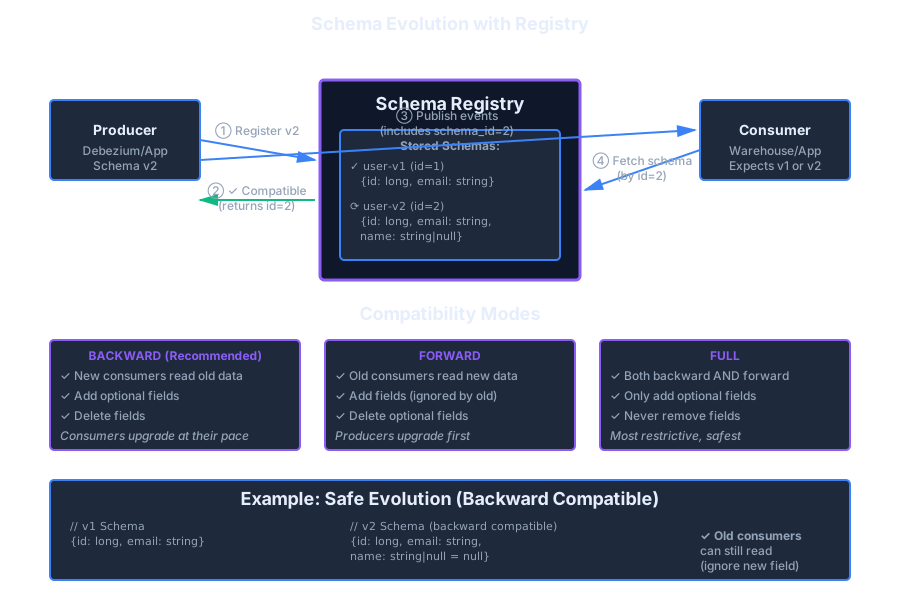
Choosing Your Contract Strategy: Compatibility Modes
A schema registry isn't just a database of schemas; it actively enforces rules. When a producer tries to register a new schema version, the registry checks it against a configured compatibility mode. Understanding these modes is critical for operations.
Backward Compatibility
(New schemas can read old data)
This mode allows you to delete fields and add optional new fields (with a default value). Consumers can upgrade at their own pace without breaking when they encounter old data.
Use this for most standard use cases. It offers the most operational flexibility.
Forward Compatibility
(Old schemas can read new data)
This mode allows you to add new fields and delete optional old fields. Because old consumers can still read data written with the new schema, you upgrade producers first and let consumers catch up at their own pace. (The opposite of backward compatibility, where consumers upgrade first.)
Full Compatibility
(Both backward and forward)
Ensures old consumers can read new data and new consumers can read old data. Safest—but most restrictive. Good for long-lived topics with many consumers.
Transitive vs Latest
Transitive checks a new schema against all previous versions. Latest checks only against the most recent version. Prefer transitive for critical topics to avoid “drift over time.”
For most CDC pipelines, start with Backward (often transitive). It balances safety with agility, letting consumers upgrade at their own pace while preventing breaking producer changes.
Subject naming & scope
Compatibility is enforced per subject (a Registry namespace). Common strategies:
-
TopicNameStrategy:
<topic>-value(simple, one record type per topic). - RecordNameStrategy: record’s full name is the subject (lets multiple record types share a topic).
- TopicRecordNameStrategy: combines both (avoids name clashes across topics).
Pick once per topic family—changing later is painful.
The Data Flow in a Schema-Aware Pipeline
user_v1id=1Upgrade to v2
user_v2id=2This flow, mediated by the schema registry, allows a producer to upgrade to a `v2` schema and start sending messages with ID `2`. An old consumer that only knows about ID `1` can either fail gracefully or, if the schemas are compatible, process the new message by ignoring the new fields.
Concrete evolution examples
Avro (v1 → v2)
// v1
{ "type":"record","name":"User","namespace":"demo",
  "fields":[
    {"name":"id","type":"long"},
    {"name":"email","type":"string"}
  ] }
// v2 (backward-compatible): add optional with default; rename with alias
{ "type":"record","name":"User","namespace":"demo",
  "fields":[
    {"name":"id","type":"long"},
    {"name":"email","type":"string"},
    {"name":"full_name","type":["null","string"],"default":null,
     "aliases":["name"]} ] }
OK under backward/backward_transitive. Dropping a required field would violate it.
Protobuf (field numbers matter)
// v1
message User { int64 id = 1; string email = 2; }
// v2 (safe): add new optional field, keep numbers stable
message User { int64 id = 1; string email = 2; string full_name = 3; }
Never reuse or renumber fields; removing a field keeps the tag reserved.
JSON Schema (tolerant readers)
{ "$schema":"https://json-schema.org/draft/2020-12/schema",
  "type":"object",
  "properties":{
    "id":{"type":"integer"},
    "email":{"type":"string"},
    "full_name":{"type":["string","null"]}
  },
  "required":["id","email"],
  "additionalProperties": true }
Set additionalProperties per policy. Many JSON
consumers ignore unknown fields—document the expectation.
Safe rollout playbooks
- Read-new / Write-old (RN/WO): upgrade consumers first to tolerate the new schema; then upgrade producers.
- Two-phase add: add optional fields with defaults → backfill downstream → switch producers to start populating.
-
Type widening: e.g.,
int→longorstring→[string,null]; avoid narrowing. - Removals: deprecate → stop usage → drop only if policy allows and all consumers have moved.
Registry operations (quick refs)
# Set per-subject compatibility (examples)
curl -X PUT -H "Content-Type: application/json" \
  --data '{"compatibility":"BACKWARD_TRANSITIVE"}' \
  $REGISTRY_URL/config/your-subject

# Get the current compatibility
curl $REGISTRY_URL/config/your-subject
Automate these in CI so topics can’t drift to unsafe modes.
CDC-specific wrinkles
-
New source columns: existing rows will emit
nulluntil updated or backfilled—plan materialization defaults. - Rename vs drop: prefer add new + alias (Avro) and keep the old field until consumers migrate.
- Envelope stability: keep event envelope fields (op/ts_ms/transaction/key) stable; evolve payload separately.
Consumer defenses
- Ignore unknown fields: choose deserializers/options that tolerate extras.
- Defaulting: when a field is missing, apply a deterministic default (document it!).
- Quarantine on hard breaks: route to DLQ with schema id and error for later replay.
Audit & test
- Contract tests: validate proposed schemas against real consumer fixtures.
- Canary topics: mirror a subset of prod through the new schema and compare sink MERGE row counts/checksums.